Bybit
Important information regarding Bybit. Please read it carefully:
- Only USDT perpetuals are supported and tested.
- Only futures trading is supported; the spot market is not available.
- Only Unified Trading is supported
- One Way and Hedge mode is supported
- Hedge mode is recommended
- Check if the master and slave are configured the same, such as One Way or Hedge mode, leverage, and so on.
- Bybit does not support multiple positions for the same symbol, only a single aggregated position. If there are multiple positions on the master account, they will be merged into one. In this case, the ticket number of the oldest position on the master account will be used for tracking purposes.
- Since Bybit only supports one aggregated position per symbol, MetaCopier adapts TP/SL management as follows:
- For Buy Positions:
- The highest Take Profit (TP) among all master positions is applied.
- The lowest Stop Loss (SL) among all master positions is applied.
- For Sell Positions:
- The lowest Take Profit (TP) among all master positions is applied.
- The highest Stop Loss (SL) among all master positions is applied.
- For Buy Positions:
- Price differences between a normal Broker and Bybit
- There can be significant price differences between a normal broker and Bybit (a direct market exchange). This is due to variations in liquidity, spreads, and pricing models used by brokers versus exchanges.
- To ensure accurate risk management, we highly recommend enabling the #tp-sl-management feature in MetaCopier and activating the "Adjust with master distance" option. This ensures that Take Profit (TP) and Stop Loss (SL) levels are adjusted dynamically based on the price difference between the master and slave accounts, improving trade execution reliability.
- Check the profit of the trades and adjust the multiplier to align the profit on the slave account, since Bybit works differently compared to a traditional forex broker.
- When adding a copier to the Bybit account, the option "Hide comment" must be activated. Manual trading or positions opened by other systems on the slave account are not recommended while this option is active, because a position can still be misclassified.
How to generate an API Key and Secret Key on Bybit
To connect your Bybit account to MetaCopier, you can generate your API keys by following these steps:
Step 1: Log in to Bybit
- Go to the Bybit website.
- Click Log In and enter your credentials (email and password).
- Complete any 2FA authentication if prompted.
Step 2: Navigate to API Management
- Click on your profile icon in the top-right corner.
- Select API from the dropdown menu.
- Or directly visit: https://www.bybit.com/app/user/api-management
Step 3: Create a New API Key
- Click Create New Key.
- Choose System-generated API Key
- Enter a label/name for your API key (e.g., "MetaCopier").
- Select API Trasaction.
- Select Read-Write
- Select No IP restriction
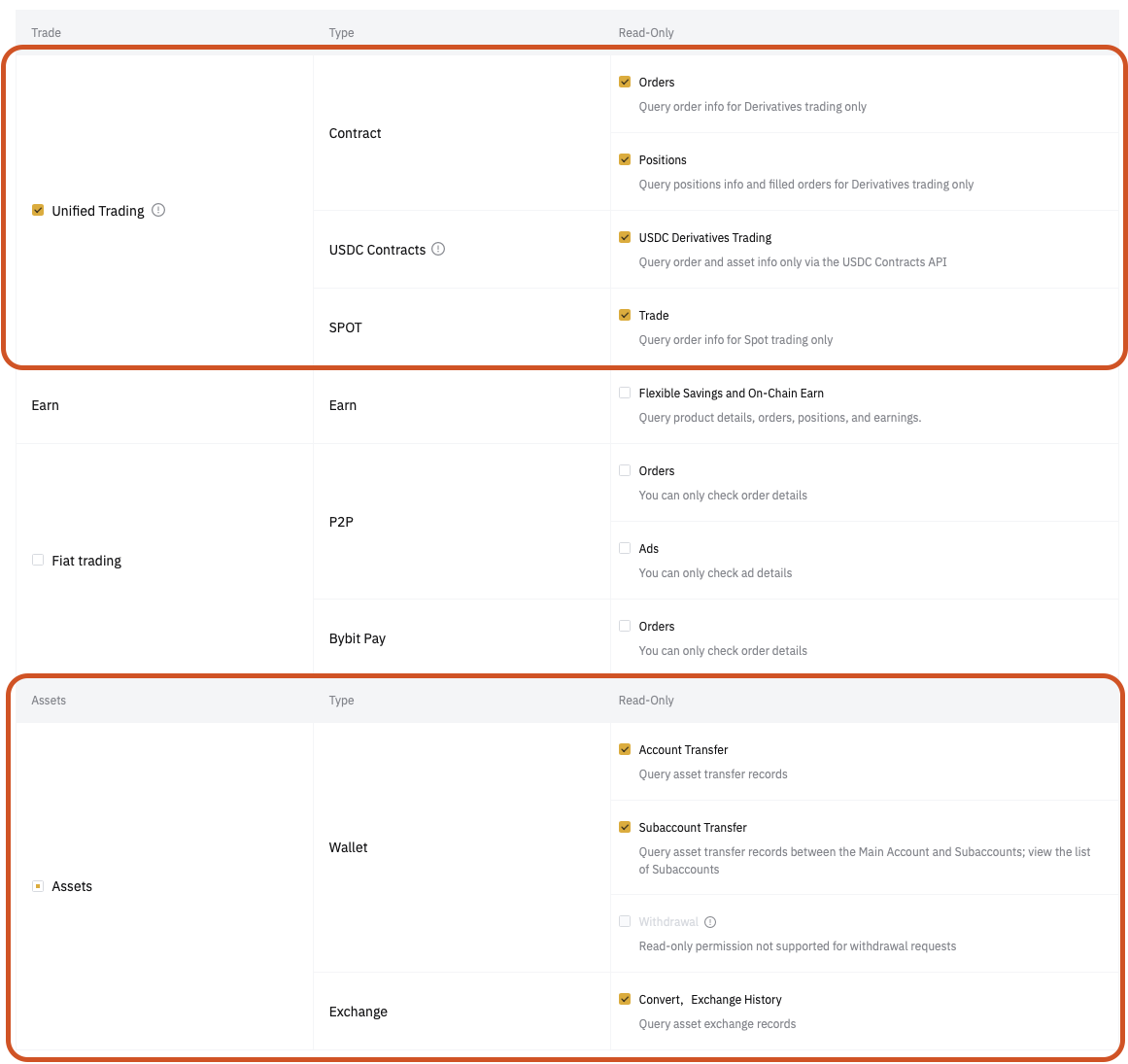
- Select "Unified Trading" (Trade) and Assets (Assets)
- Click Submit and complete the verification steps (email/SMS/2FA).
- API keys that are not bound to IP addresses are valid for three (3) months
Step 4: Connect to MetaCopier
-
Log in to MetaCopier.
-
Create a Bybit account
-
Enter your API Key and Secret Key in the password field using the format:
apikey|secretkey -
If the account can not connect try using a different region
Security Tips
- Do not share your Secret Key with anyone.